
Stop juggling a dozen tabs. Classify HS codes, ECCNs and dual-use goods, with country tariffs, binding rulings and legal notes, all from a single screen.
Short answer: A single-window classification console puts everything a classifier needs (the worklist, HS and ECCN classification, the WCO General Rules of Interpretation, Section and Chapter notes, binding rulings and country tariffs) on one screen. TariffWolf builds customized consoles of this kind for enterprise trade compliance teams. By TariffWolf’s own figures, customers spend up to 60% less time per classification once they stop switching between tools.
What slows down HS and export classification work?
Ask a trade compliance professional what slows them down, and they rarely say “the actual classification.” They say the scramble around it.
One HS classification decision means opening the classification tool in one tab, the destination country’s tariff schedule in another, the Explanatory Notes and Section and Chapter legal notes in a third, a binding ruling database (CBP CROSS, EU BTI) in a fourth, and maybe a spreadsheet to track it all in a fifth. Switch to export control classification and the tab count doubles: now you’re cross-referencing ECCN parameters, dual-use control lists and license requirements across another stack of windows. An ECCN (Export Control Classification Number) is the code that places an item on the US Commerce Control List.
Every tab switch is a small break in concentration. Multiply that across hundreds of SKUs, a high-volume import season or a backlog of dual-use determinations, and tab chaos becomes one of the most expensive line items in your compliance workflow. The bill arrives as lost hours, errors and burnout.
That’s the problem TariffWolf set out to kill.
What is a single-window classification console?
A single-window classification console is one workspace that holds everything a classifier needs to make a confident, defensible decision, so they never have to leave it. TariffWolf builds customized, single-window classification consoles for enterprise trade compliance teams. The idea is simple, and it is surprisingly rare.
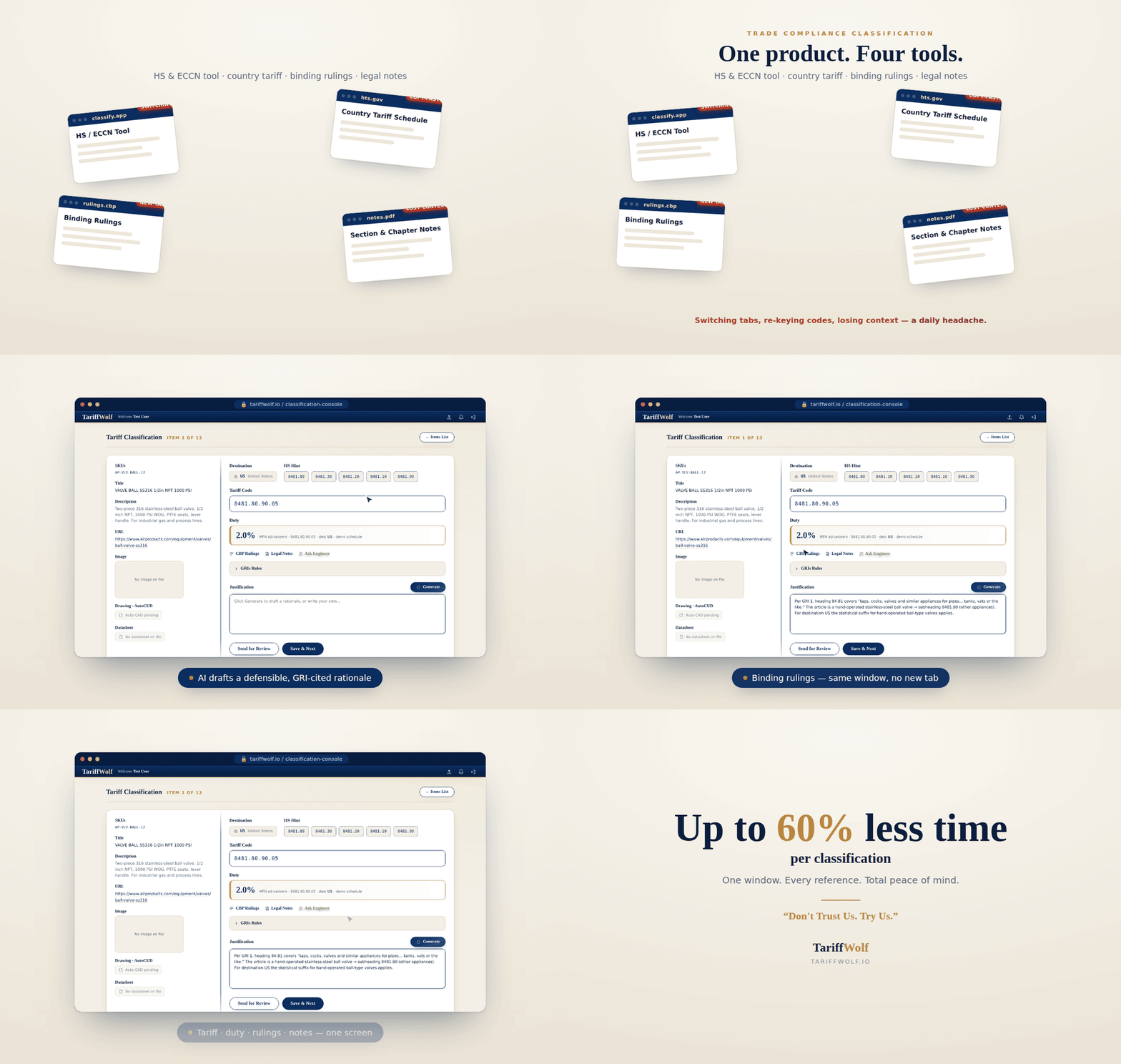
You stop alt-tabbing between five tools, copy-pasting product descriptions into a separate ruling search and losing your place in a 600-item worklist. With one window, classifiers spend up to 60% less time per classification.
Beyond speed, it gives teams back something they forgot they were missing: a calm, focused way of working.
What does the TariffWolf Classification Console include?
The TariffWolf Classification Console replaces a whole toolchain with one purpose-built workspace. These are its parts.
A unified worklist
The console opens to a filterable grid of everything that needs classifying, with SKU, product title, destination country, HS/tariff code and ECCN side by side. You can search and filter by any of those fields to find an item in seconds, without hunting through spreadsheets or asking which version is current.
Can HS and ECCN classification be done in the same tool?
Yes. In the TariffWolf console you classify the HS code for an item, then move to its ECCN or dual-use classification without leaving the window. Tariff classification and trade controls have lived in separate tools for decades. Here it is one product, one record, both determinations, fully connected. For global teams handling import classification and export control in parallel, that alone changes the day. (We go deeper on this in HS and ECCN classification in one workflow.)
The General Rules of Interpretation, one click away
The complete, verbatim WCO General Rules of Interpretation (GRI), Rules 1 to 6, are one click away inside the console. The GRIs are the rules customs authorities apply to decide which heading a product belongs in, and keeping them in view keeps your reasoning anchored to them.
Legal notes and binding rulings beside the candidate codes
Classifiers see the Section and Chapter legal notes and relevant binding rulings (BTI and CBP rulings) beside the candidate codes, instead of opening separate databases. This is where one window helps most: the supporting evidence sits next to the decision it supports. (Why ruling search is hard in the first place is covered in The Ruling Is There, The Words Aren’t.)
Built-in review and collaboration
Classification is a team job, so the workflow is built into the console with live, color-coded statuses: Pending on Engineer, Answered by Engineer, Pending on Reviewers, Reviewed, and Classification Pending. Everyone can see where each item stands.
Need a second opinion? “Ask a Classification Engineer” opens a threaded conversation against that specific SKU. Ready for sign-off? “Send for Review” routes the item to your reviewers with the full message thread attached. The back-and-forth that used to scatter across inboxes now lives where the work happens: searchable, tracked and tied to the item for good.
Bulk upload for high-volume classification
Classifying hundreds of products? Drop a SKU list as a CSV and import the whole batch at once, or add single entries as you go. The console scales from a one-off determination to an enterprise-wide classification program without changing how you work.
Is the console audit-ready?
Yes. Every item in the console carries its history: a complete trail of who classified what, when and why, with the engineer and reviewer threads kept alongside. When a customs audit, a post-clearance review or an internal control check arrives, the evidence is already assembled, so nobody has to rebuild it under pressure.
Pick a time on the calendar that loads next — no email back-and-forth.
How much time does a single-window console save?
TariffWolf customers reclaim up to 60% of the time previously lost to the mechanics of classification: tab-switching, repeated searching and scattered communication. The savings are real and measurable.
Speed is only half of it. Because the rules, notes, rulings and country tariff context sit in one verified workspace, and because every code can be expert-verified and audit-ready before it is finalized, teams move faster and with more confidence. The result is fewer misclassifications and costly customs penalties, and less dread before an audit.
Why does the console need to be customized?
No two enterprises classify the same way. A US importer relies on HTSUS and CBP rulings; an EU exporter works in CN codes, BTI rulings and EU Dual-Use terminology; a global manufacturer needs both at once. So TariffWolf delivers customized classification consoles, configured to your jurisdictions, your control-list framework, your terminology and your brand, instead of a one-size-fits-all box you have to bend your process around. The tool adapts to your compliance reality.
Trade compliance is hard enough without fighting your own tools. Putting HS classification, export control classification, country tariffs, binding rulings and legal notes in one window gives your team up to 60% of its time back and leaves a cleaner record of every decision.
Frequently asked questions
What is a single-window classification console?
It is one workspace that holds a team’s classification worklist together with HS and ECCN classification, the GRIs, Section and Chapter notes, binding rulings and country tariffs. The classifier makes and documents the decision without switching between separate tools.
Can TariffWolf classify both HS codes and ECCNs for the same product?
Yes. In the TariffWolf console, the HS code and the ECCN or dual-use classification for an item sit in one record, so both determinations are made and stored together.
How many products can I classify at once?
You can upload a SKU list as a CSV and import the whole batch in one go, or add single entries. The console is built to scale from a single determination to an enterprise-wide classification program.
Does the console keep an audit trail?
Yes. Each item keeps a full history of who classified it, when and why, along with the engineer and reviewer message threads, so the evidence is ready for a customs audit or post-clearance review.
Don’t Trust Us. Try Us.
See the single-window Classification Console in action and find out what your team could do with 60% of its classification time back.